Logistic regression with aggregate data

Logistic regression is a technique for analyzing data where the dependent variable is binary. In this post, we will introduce logistic regression and then discuss how to fit a logistic regression model using only aggregated count data.

Logistic regression overview

Logistic regression can be used when the dependent variable \(Y_i\) is binary. For example, in a medical study the dependent variable might be whether or not a patient developed a disease. In this case \(Y_i=1\) will mean that patient \(i\) did develop the disease and \(Y_i=0\) will mean that that patient \(i\) did not develop the disease. In logistic regression, the independent variables can either be categorical or quantitative. In the medical example, the type of treatment received could be a categorical independent variable and the age of the patient could be a quantitative independent variable.

Logistic regression models the probability that \(Y_i=1\) given the independent variables. If \(X_{i,1},\ldots,X_{p,1}\) are the values of the independent variables for patient \(i\), then logistic regression assumes that

\(\mathrm{Pr}(Y_i=1) = \sigma(\beta_0 + \beta_1 X_{i,1} + \cdots +\beta_p X_{i,p}) \),

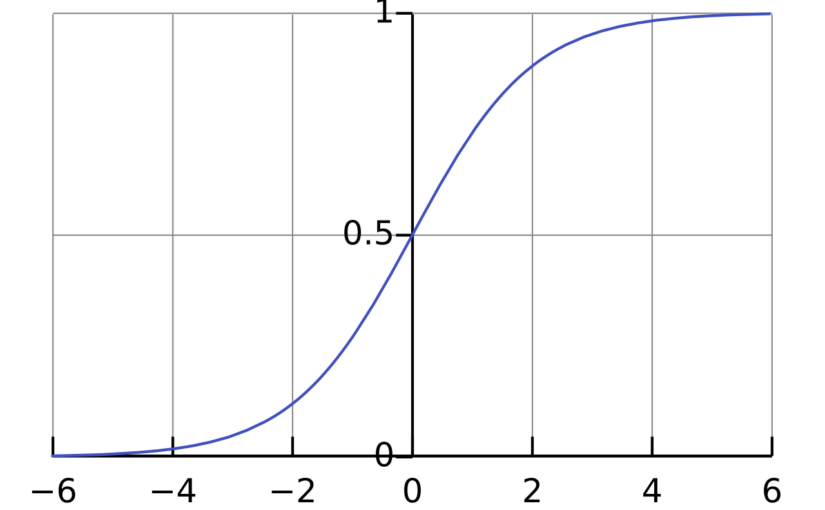
where \(\mathrm{Pr}(Y_i=1)\) is the probability that \(Y_i = 1\), \(\sigma\) is the logistic function \(\sigma(x) = \frac{1}{1+\exp(-x)}\) and \(\beta_0,\beta_1,\ldots,\beta_p\) are parameters that will be estimated from the data. The interpretation of the parameter \(\beta_j\) is that if \(X_{i,j}\) increases by 1 unit and all the other independent variables are fixed, then the odds \(\frac{\mathrm{Pr}(Y_i=1)}{\mathrm{Pr}(Y_i=0)}\) will increase by a factor of \(\exp(\beta_j)\).

Logistic regression models can be fit to data in using the function glm() in the programming language R. For example, to fit a logistic regression model with dependent variable disease and independent variables treatment and age, you can use the code

logistic_model <- glm(
          disease ~ treatment + age, 
          data = data, 
          family = binomial)

To view the estimates of the parameters of the model (as well as standard errors and p-values), you can run the code summary(logistic_model).

Logistic regression with aggregate data

If all of the independent variables are categorical, then it is possible to fit a logistic model with the aggregate count data. For example, the table below is from a study from the 1980s/1990s on the effect of AZT treatment on slowing the development of AIDS.1

RaceAZT useSymptomsNo Symptoms
BlackYes1152
BlackNo1243
WhiteYes1493
WhiteNo3281

The study featured 338 veterans who were positive for HIV and were beginning to show signs of faltering immune systems. The veterans were randomly assigned to either immediately receive AZT or to receive AZT once their T-cells showed signs of severe immune weakness. The table records whether the veterans received AZT immediately, the race of the veterans and whether they developed AIDS in the three year study period.

The table above shows aggregated data. The table reports the number of people for each combination of treatment, race and disease status. The table does not report individual patient data. However, it is it possible to fit a logistic regression model to the aggregate data.2 We just need to make some small changes to the R code.

To describe the changes, let’s first review what we would do with the patient level data. Suppose we had a dataset individual_data that had a row for each veteran and had columns race, azt_use and developed_symptoms that record the veteran’s race, AZT use and whether they developed symptoms. Our goal is to fit a logistic regression model where dependent variable \(Y_i\) is a binary variable with \(Y_i=1\) meaning that the patient did develop symptoms. The independent variables are race and AZT use. With the individual data, we could use the following:

individual_model <- glm(
    developed_symptoms ~ race + azt_use, 
    family = binomial, 
    data = individual_data)

Now suppose that we only have the aggregate data in a table called aggregate_data. This table has columns race, azt_use, symptoms and no_symptoms like the table presented above. To fit the logistic model with this data, there are two options.

  • The first option is to replace the independent variable developed_symptoms in the individual model with cbind(symptoms, no_symptoms). The function cbind creates a matrix with two columns recording the number of people with and without symptoms for each combination of race and AZT use. We also need to tell R to use the aggregate data. Here is the R code:
aggregate_model_1 <- glm(
    cbind(symptoms, no_symptoms) ~ race + azt_use, 
    family = binomial, 
    data = aggregate_data
  • The other option is to replace the independent variable developed_symptoms with the proportion of people who developed symptoms. To use this option, it is also necessary to compute the total number of people for each combination of race and AZT use. These totals are used as weights in the logistic regression. In the code below, we first compute the proportion and the total number of people and then fit the model.
aggregate_data$total <- aggregate_data$symptoms + aggregate_data$no_symptomsaggregate_data$proportion <- aggregate_data$symptoms / aggregate_data$total

aggregate_model_2 <- glm(
    proportion ~ race + azt_use, 
    family = binomial,    weights = total,    data = aggregate_data)

Results

Both aggregate_model_1 and aggregate_model_2 produce the exact same parameter estimates, standard errors and p-values. More importantly, if we had the individual data, individual_model would also have the same results. We can actually check this by “de-aggregating” the data. This involves making a dataset with, for example, 11 rows with race = "Black", azt_use = "Yes" and developed_symptoms = 1 so that these 11 rows represent the 11 veterans in the first category of the table above.

All three logisitic regression models give the same final results:

EstimateStandard errorp-value
Intercept-1.070.2634e-05
raceWhite0.050.2890.848
atz_useYes-0.7190.2790.01

The parameter estimates shows that Black and White veterans had approximately the same chance of developing symptoms (assuming that they either both received ATZ treatment or that neither of them received ATZ treatment). On the other hand, the parameter estimate for ATZ use is significant. The estimated value of -0.719 can be interpreted as follows. If the race of the veteran is held constant, then the odds of developing symptoms was half as high for the veterans who immediately took ATZ than for those who waited. In mathematical symbols:

\(\frac{\mathrm{Pr}(\text{developed symptoms} \mid \text{ATZ immediately})}{\mathrm{Pr}(\text{did not develop symptoms} \mid \text{ATZ immediately})}\)

is roughly equal to

\( 0.5 \times \frac{\mathrm{Pr}(\text{developed symptoms} \mid \text{waited for ATZ use})}{\mathrm{Pr}(\text{did not develop symptoms} \mid \text{waited for ATZ})} \)

The specific value of 0.5 comes from the fact that \(\exp(-0.719) \approx 0.5\). Section 5.4.2 of Categorical Data Analysis by Alan Agresti discusses the interpretation of the parameter estimates for this example in more detail.

R code for fitting all three models is available at the end of this post.3

Footnotes

  1. The data on AZT is from Table 5.6 of Alan Agresti’s Categorical Data Analysis (3rd edition) https://onlinelibrary.wiley.com/doi/book/10.1002/0471249688, https://mybiostats.wordpress.com/wp-content/uploads/2015/03/3rd-ed-alan_agresti_categorical_data_analysis.pdf ↩︎
  2. In statistical jargon, the aggregate data are sufficient statistics for the logistic regression model. ↩︎
  3. R code: ↩︎

# Aggregate data from Agresti Table 5.6
aggregate_data <- data.frame(
  race = c("Black", "Black", "White", "White"),
  atz_use = c("yes", "no", "yes", "no"),
  symptoms = c(11, 12, 14, 32),
  no_symptoms = c(52, 43, 93, 81)
)

# Aggregate model 1 using cbind()
aggregate_model_1 <- glm(
  cbind(symptoms, no_symptoms) ~ race + atz_use,
  data = aggregate_data,
  family = binomial)

# Aggregate model 2 using proportions and weights
aggregate_data$total <- aggregate_data$symptoms + aggregate_data$no_symptoms
aggregate_data$proportion <- aggregate_data$symptoms / aggregate_data$total

aggregate_model_2 <- glm(
  proportion ~ race + atz_use,
  data = aggregate_data,
  weights = total,
  family = binomial)

# Individual model

# Function to "de-aggregate"
deaggregate_data <- function(aggregate_data) {
  # Create an empty list to store rows
  rows_list <- list()
  
  # Iterate through each row of aggregate data
  for (i in 1:nrow(aggregate_data)) {
    race_val <- aggregate_data$race[i]
    atz_val <- aggregate_data$atz_use[i]
    n_symptoms <- aggregate_data$symptoms[i]
    n_no_symptoms <- aggregate_data$no_symptoms[i]
    
    # Create rows for those with symptoms
    if (n_symptoms > 0) {
      rows_list[[length(rows_list) + 1]] <- data.frame(
        race = rep(race_val, n_symptoms),
        atz_use = rep(atz_val, n_symptoms),
        developed_symptoms = rep(1, n_symptoms)
      )
    }
    
    # Create rows for those without symptoms
    if (n_no_symptoms > 0) {
      rows_list[[length(rows_list) + 1]] <- data.frame(
        race = rep(race_val, n_no_symptoms),
        atz_use = rep(atz_val, n_no_symptoms),
        developed_symptoms = rep(0, n_no_symptoms)
      )
    }
  }
  
  # Combine all rows into one data frame
  do.call(rbind, rows_list)
}

individual_data <- deaggregate_data(aggregate_data)

individual_model <- glm(
  developed_symptoms ~ race + atz_use,
  data = individual_data,
  family = binomial
)

# Compare models
summary(aggregate_model_1)
summary(aggregate_model_2)
summary(individual_model)
Finding Australia’s youngest electorates with R

My partner recently wrote an article for Changing Times, a grassroots newspaper that focuses on social change. Her article, Who’s not voting? Engaging with First Nations voters and young voters, is about voter turn-out in Australia and an important read.

While doing research for the article, she wanted to know which electorates in Australia had the highest proportion of young voters. Fortunately the Australian Electoral Commission (AEC) keeps a detailed record of the number of electors in each electorate available here. The records list the number of voters of a given sex and age bracket in each of Australia’s 153 electorates. To calculate and sort the proportion of young voters (18-29) in each electorate using the most recent records, I wrote the below R code for her:

library(tidyverse)

voters <- read_csv("elector-count-fe-2022.csv", 
                   skip = 8,
                   col_names = c("Description",
                                 "18-19", 
                                 "20-24", 
                                 "25-29", 
                                 "30-34", 
                                 "35-39", 
                                 "40-44", 
                                 "45-49", 
                                 "50-54", 
                                 "55-59", 
                                 "60-64", 
                                 "65-69", 
                                 "70+",  
                                 "Total"),
                   col_select = (1:14),
                   col_types = cols(Description = "c",
                                    .default = "n"))


not_electorates = c("NSW", "VIC", "ACT", "WA", "SA", "TAS", 
                    "QLD", "NT", "Grand Total","Female", 
                    "Male", "Indeterminate/Unknown")

electorates <- voters %>% 
  filter(!(Description %in% not_electorates),
         !is.na(Description))  

young_voters <- electorates %>% 
  mutate(Young = `18-19` + `20-24`,
         Proportion = Young/Total,
         rank = min_rank(desc(Proportion))) %>% 
  arrange(rank) %>% 
  select(Electorate = Description, Total, Young, Proportion, rank) 

young_voters

To explain what I did, I’ll first describe the format of the data set from the AEC. The first column contained a description of each row. All the other columns contained the number of voters in a given age bracket. Rows either corresponded to an electorate or a state and either contained the total electorate or a given sex.

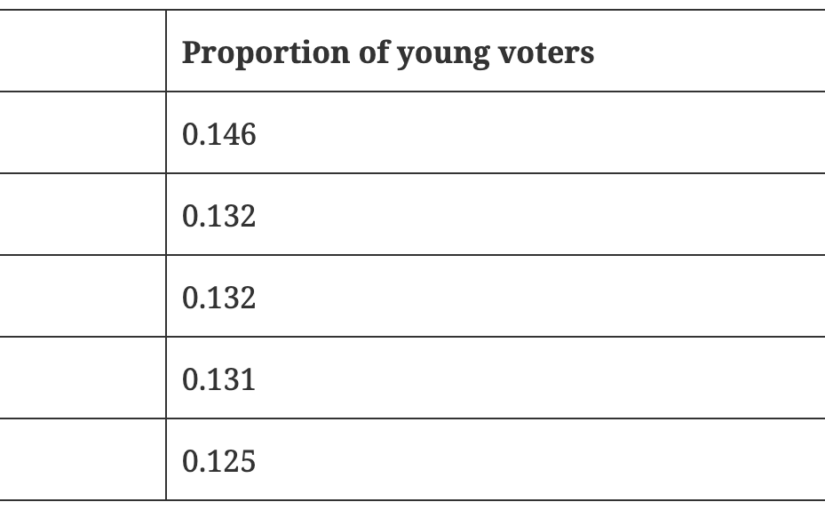
For the article my partner wanted to know which electorate had the highest proportion of young voters (18-24) in total so we removed the rows for each state and the rows that selected a specific sex. The next step was to calculate the number of young voters across the age brackets 18-19 and 20-24 and then calculate the proportion of such voters. Once ranked, the five electorates with the highest proportion of young voters were

ElectorateProportion of young voters
Ryan0.146
Brisbane0.132
Griffith0.132
Canberra0.131
Kooyong0.125

In Who’s not Voting?, my partner points out that the three seats with the highest proportion of voters all swung to the Greens at the most recent election. To view all the proportion of young voters across every electorate, you can download this spreadsheet.

Working with ABC Radio’s API in R

This post is about using ABC Radio’s API to create a record of all the songs played on Triple J in a given time period. An API (application programming interface) is a connection between two computer programs. Many websites have API’s that allow users to access data from that website. ABC Radio has an API that lets users access a record of the songs played on the station Triple J since around May 2014. Below I’ll show how to access this information and how to transform it into a format that’s easier to work with. All code can be found on GitHub here.

Packages

To access the API in R I used the packages “httr” and “jsonlite”. To transform the data from the API I used the packages “tidyverse” and “lubridate”.

library(httr)
library(jsonlite)
library(tidyverse)
library(lubridate)

ABC Radio’s API

The URL for the ABC radio’s API is:

https://music.abcradio.net.au /api/v1/plays/search.json.

If you type this into a web browser, you can see a bunch of text which actually lists information about the ten most recently played songs on ABC’s different radio stations. To see only the songs played on Triple J, you can go to:

https://music.abcradio.net.au/api/v1/plays/search.json?station=triplej.

The extra text “station=triplej” is called a parameter. We can add more parameters such as “from” and “to”. The link:

https://music.abcradio.net.au/api/v1/plays/search.json?station=triplej&from=2021-01-16T00:00:00.000Z&to=2021-01-16T00:30:00.000Z

shows information about the songs played in the 30 minutes after midnight UTC on the 16th of January last year. The last parameter that we will use is limit which specifies the number of songs to include. The link:

https://music.abcradio.net.au/api/v1/plays/search.json?station=triplej&limit=1

includes information about the most recently played song. The default for limit is 10 and the largest possible value is 100. We’ll see later that this cut off at 100 makes downloading a lot of songs a little tricky. But first let’s see how we can access the information from ABC Radio’s API in R.

Accessing an API in R

We now know how to use ABC Radio’s API to get information about the songs played on Triple J but how do we use this information in R and how is the information stored. The function GET from the package “httr” enables us to access the API in R. The input to GET is simply the same sort of URL that we’ve been using to view the API online. The below code stores information about the 5 songs played on Triple J just before 5 am on the 5th of May 2015

res <- GET("https://music.abcradio.net.au/api/v1/plays/search.json?station=triplej&limit=5&to=2015-05-05T05:00:00.000Z")
res
# Response [https://music.abcradio.net.au/api/v1/plays/search.json?station=triplej&limit=5&to=2015-05-05T05:00:00.000Z]
# Date: 2022-03-02 23:25
# Status: 200
# Content-Type: application/json
# Size: 62.9 kB

The line “Status: 200” tells us that we have successfully grabbed some data from the API. There are many other status codes that mean different thing but for now we’ll be happy remembering that “Status: 200” means everything has worked.

The information from the API is stored within the object res. To change it from a JSON file to a list we can use the function “fromJSON” from the library jsonlite. This is done below

data <- fromJSON(rawToChar(res$content))
names(data)
# "total"  "offset" "items"

The information about the individual songs is stored under items. There is a lot of information about each song including song length, copyright information and a link to an image of the album cover. For now, we’ll just try to find the name of the song, the name of the artist and the time the song played. We can find each of these under “items”. Finding the song title and the played time are pretty straight forward:

data$items$recording$title
# "First Light" "Dog"         "Begin Again" "Rot"         "Back To You"
data$items$played_time
# "2015-05-05T04:55:56+00:00" "2015-05-05T04:52:21+00:00" "2015-05-05T04:47:52+00:00" "2015-05-05T04:41:00+00:00" "2015-05-05T04:38:36+00:00"

Finding the artist name is a bit trickier.

data$items$recording$artists
# [[1]]
# entity       arid          name artwork
# 1 Artist maQeOWJQe1 Django Django    NULL
# links
# 1 Link, mlD5AM2R5J, http://musicbrainz.org/artist/4bfce038-b1a0-4bc4-abe1-b679ab900f03, 4bfce038-b1a0-4bc4-abe1-b679ab900f03, MusicBrainz artist, NA, NA, NA, service, musicbrainz, TRUE
# is_australian    type role
# 1            NA primary   NA
# 
# [[2]]
# entity       arid      name artwork
# 1 Artist maXE59XXz7 Andy Bull    NULL
# links
# 1 Link, mlByoXMP5L, http://musicbrainz.org/artist/3a837db9-0602-4957-8340-05ae82bc39ef, 3a837db9-0602-4957-8340-05ae82bc39ef, MusicBrainz artist, NA, NA, NA, service, musicbrainz, TRUE
# is_australian    type role
# 1            NA primary   NA
# ....
# ....

We can see that each song actually has a lot of information about each artist but we’re only interested in the artist name. By using “map_chr()” from the library “tidyverse” we can grab each song’s artist name.

map_chr(data$items$recording$artists, ~.$name[1])
# [1] "Django Django" "Andy Bull"     "Purity Ring"   "Northlane"     "Twerps"

Using name[1] means that if there are multiple artists, then we only select the first one. With all of these in place we can create a tibble with the information about these five songs.

list <- data$items
tb <- tibble(
     song_title = list$recording$title,
     artist = map_chr(list$recording$artists, ~.$name[1]),
     played_time = ymd_hms(list$played_time)
) %>% 
  arrange(played_time)
tb
# # A tibble: 5 x 3
# song_title  artist        played_time        
# <chr>       <chr>         <dttm>             
# 1 Back To You Twerps        2015-05-05 04:38:36
# 2 Rot         Northlane     2015-05-05 04:41:00
# 3 Begin Again Purity Ring   2015-05-05 04:47:52
# 4 Dog         Andy Bull     2015-05-05 04:52:21
# 5 First Light Django Django 2015-05-05 04:55:56

Downloading lots of songs

The maximum number of songs we can access from the API at one time is 100. This means that if we want to download a lot of songs we’ll need to use some sort of loop. Below is some code which takes in two dates and times in UTC and fetches all the songs played between the two times. The idea is simply to grab all the songs played in a five hour interval and then move on to the next five hour interval. I found including an optional value “progress” useful for the debugging. This code is from the file get_songs.r on my GitHub.

download <- function(from, to){
  base <- "https://music.abcradio.net.au/api/v1/plays/search.json?limit=100&offset=0&page=0&station=triplej&from="
  from_char <- format(from, "%Y-%m-%dT%H:%M:%S.000Z")
  to_char <- format(to, "%Y-%m-%dT%H:%M:%S.000Z")
  url <- paste0(base,
                from_char,
                "&to=",
                to_char)
  res <- GET(url)
  if (res$status == 200) {
    data <- fromJSON(rawToChar(res$content))
    list <- data$items
    tb <- tibble(
      song_title = list$recording$title,
      artist = map_chr(list$recording$artists, ~.$name[1]),
      played_time = ymd_hms(list$played_time)
    ) %>% 
      arrange(played_time)
    return(tb)
  }
}

get_songs <- function(start, end, progress = FALSE){
  from <- ymd_hms(start)
  to <- from + dhours(5)
  end <- ymd_hms(end)
  
  songs <- NULL
  
  while (to < end) {
    if (progress) {
      print(from)
      print(to)
    }
    tb <- download(from, to)
    songs <- bind_rows(songs, tb)
    from <- to + dseconds(1)
    to <- to + dhours(5)
  }
  tb <- download(from, end)
  songs <- bind_rows(songs, tb)
  return(songs)
}

An example

Using the functions defined above, we can download all the sounds played in the year 2021 (measured in AEDT).

songs <- get_songs(ymd_hms("2020-12-31 13:00:01 UTC"),
                   ymd_hms("2021-12-31 12:59:59 UTC",
                   progress = TRUE)

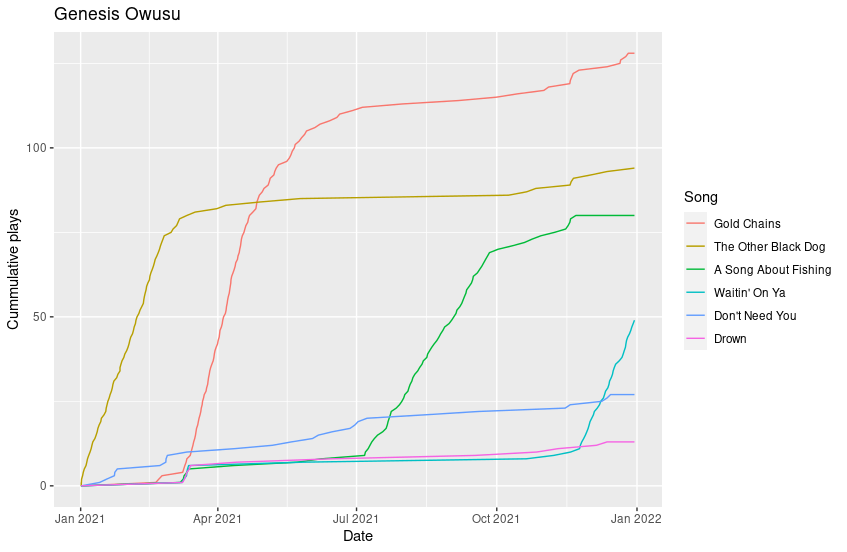
This code takes a little while to run so I have saved the output as a .csv file. There are lots of things I hope to do with this data such as looking at the popularity of different songs over time. For example, here’s a plot showing the cumulative plays of Genesis Owusu’s top six songs.

I’ve also looked at using the data from last year to get a list of Triple J’s most played artists. Unfortunately, it doesn’t line up with the official list. The issue is that I’m only recording the primary artist on each song and not any of the secondary artists. Hopefully I’ll address this in a later blog post! I would also like to an analysis of how plays on Triple J correlate with song ranking in the Hottest 100.